Why Your Internet Feels Slow Even When You Are Paying for Fast Internet?
Understanding the Hidden Causes Behind Slow Internet Performance

Introduction
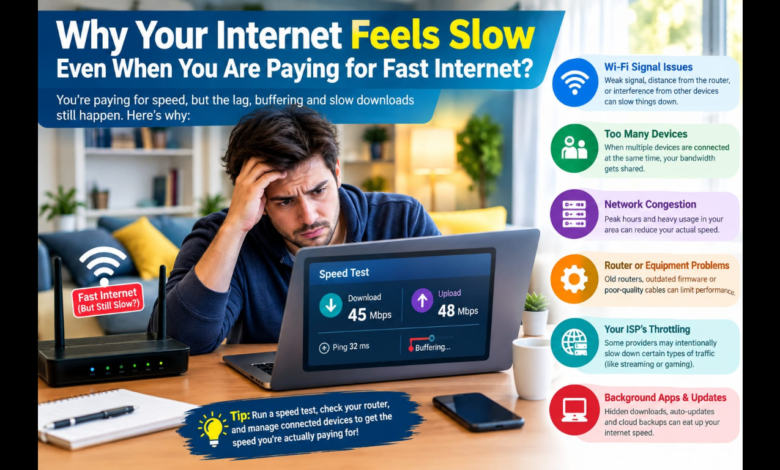
Paying for a high-speed internet package does not always mean every device in your home will experience that advertised speed. You may have a 100 Mbps, 300 Mbps, or even 1 Gbps plan and still notice slow websites, buffering videos, delayed downloads, or frustrating online connections.
The reason is simple: internet speed is only one part of the overall connection experience. The performance you actually receive depends on your internet provider, modem, router, Wi-Fi signal, connected devices, network congestion, and even the particular website or service you are using.
Google and the Federal Communications Commission both note that home Wi-Fi, device limitations, congestion, and network conditions can affect the performance users experience.
Your Internet Plan Is Not the Same as Your Wi-Fi Speed
One of the biggest misunderstandings is assuming that the speed advertised by your ISP automatically reaches every device wirelessly.
Your provider delivers an internet connection to your home. Your router then distributes that connection among phones, computers, televisions, gaming systems, and other connected devices.
If your broadband connection is fast but your Wi-Fi network has a weak signal, interference, or an outdated router, your device may experience much slower performance.
This means you could be paying for fast internet while the real bottleneck exists inside your home.
1. Your Router May Be the Problem
An older router may not be capable of handling the speed of a modern broadband plan efficiently.
Router technology has improved significantly, and newer devices can provide better wireless performance, support more devices, and make better use of available Wi-Fi bands.
The FCC recommends checking whether your router is capable of supporting the speed included in your subscription. An outdated router can become a bottleneck even when the ISP connection itself is working properly.
If your internet plan was recently upgraded but your router is several years old, checking the router’s specifications can be a useful first step.
2. Your Device May Be Too Far From the Router
Distance matters.
The farther your phone, laptop, or television is from the Wi-Fi router, the weaker the wireless signal can become. Walls, floors, furniture, and other physical obstacles can make the situation worse.
Google recommends placing Wi-Fi equipment in open locations and reducing physical obstructions where possible.
A simple test is to move your device close to the router and run another speed test.
If the connection becomes dramatically faster, your internet plan may not be the main problem. Wi-Fi coverage could be the issue.
3. Too Many Devices Are Sharing Your Connection
Your internet connection is often shared among many devices.
For example, someone might be watching a high-resolution video while another person is downloading a large file and another device is performing cloud backups.
Every active device consumes some amount of bandwidth. During heavy usage, the available capacity is divided among those activities.
The FCC notes that multiple wireless devices using the same network can affect performance, while Google explains that network congestion can occur when connected devices collectively exceed available bandwidth.
4. Wi-Fi Interference Can Reduce Performance
Wireless networks operate over radio frequencies, and nearby networks can compete for the same wireless space.
This can be particularly noticeable in apartments, offices, and densely populated neighborhoods where many routers are operating nearby.
Other electronic devices can also contribute to wireless interference. Google specifically identifies neighboring Wi-Fi networks and certain household electronics as potential sources of interference.
Moving your router to a more open location and using appropriate Wi-Fi settings can sometimes improve performance.
5. 2.4 GHz and 5 GHz Wi-Fi Are Different
Many modern routers support both 2.4 GHz and 5 GHz Wi-Fi.
The 2.4 GHz band generally offers greater coverage, while 5 GHz can provide faster performance under suitable conditions but typically has shorter effective range.
Google notes that devices connected to 2.4 GHz may not achieve speeds as high as those possible on 5 GHz.
If your device is close enough to the router, connecting through the appropriate 5 GHz network may provide better performance.
6. Your Internet Provider Could Be Experiencing Congestion
Sometimes the problem really is outside your home.
Internet providers can experience network congestion, maintenance problems, outages, or other technical issues. Performance can also vary during periods of heavy network usage.
Google explains that congestion can occur on an ISP’s network or elsewhere on the internet, potentially affecting speed-test results and everyday performance.
If your connection is consistently slow across multiple devices, especially when they are connected directly or very close to the router, contacting your ISP may be appropriate.
7. Speed Tests Do Not Tell the Whole Story
A speed test is useful, but it does not necessarily represent everything you experience online.
Different speed tests connect to different servers. The location of the server, network conditions, and route between your device and the server can influence the result.
Google explains that speed-test results can vary because tests may use different servers and because network congestion can change over time.
For this reason, do not judge your entire internet connection from a single test.
Run several tests at different times and compare the results.
8. The Website or App May Be Slow
Sometimes your own connection is perfectly healthy, but the service you are trying to access is having problems.
An online service can experience high traffic, server problems, technical maintenance, or other performance issues.
The FCC notes that a user’s perceived internet performance can be affected by bottlenecks beyond the ISP’s network and by the architecture and performance of individual applications.
If one website is slow while other websites and apps work normally, your home internet may not be responsible.
9. Your Computer or Phone Could Be Limiting Performance
Internet performance also depends on the device.
An older phone, computer, or network adapter may not support newer Wi-Fi standards or higher wireless speeds.
Background applications can also consume network resources. Cloud synchronization, operating-system updates, large downloads, and streaming services can quietly use bandwidth while you are doing something else.
Therefore, test the connection on more than one device before deciding that the ISP is responsible.
10. Restarting Your Network Can Help
A basic restart is surprisingly useful for troubleshooting.
Turn off your router and associated networking equipment, wait briefly, and restart them according to the manufacturer’s instructions.
The FCC lists a simple router reboot as a troubleshooting step that can sometimes resolve connectivity problems.
However, if slow performance keeps returning, restarting the router every day is not a real solution. You should investigate the underlying cause.
How to Find the Real Cause of Slow Internet
A systematic test can help you identify the problem.
Step 1: Test Near the Router
Run a speed test while standing close to the router.
Step 2: Test Another Device
Check whether the same problem happens on another phone or computer.
Step 3: Check Your Connected Devices
Look for televisions, computers, phones, consoles, cameras, and other equipment actively using the network.
Step 4: Test at Different Times
Compare performance during quieter periods and busy evening hours.
Step 5: Check the Router
Confirm that your router supports your subscribed internet speed and current Wi-Fi standards.
Step 6: Check With Your ISP
If multiple devices remain slow even under good Wi-Fi conditions, ask your provider about outages, congestion, equipment problems, or service issues.
Conclusion
If your internet feels slow despite paying for a fast package, the problem does not necessarily mean your ISP is failing to deliver what you purchased.
The bottleneck could be your router, Wi-Fi signal, distance, walls, interference, connected devices, network congestion, device limitations, or the website you’re visiting.
Start by testing close to the router and comparing multiple devices and times. These simple checks can help determine whether the problem is inside your home or somewhere farther along the internet connection.
Ultimately, a fast internet plan provides the potential for high performance—but your entire network needs to be capable of delivering that performance to the device in your hands.